One Agent endpoint
Codex, Claude Code, OpenCode, WorkBuddy, Pi, OpenClaw, HermesAgent, LangChain, and custom clients share one authenticated service.
Camofox Web Search is a self-hosted, read-only Web Search service for Codex, Claude Code, OpenCode, WorkBuddy, Pi, OpenClaw, HermesAgent, and custom Agents. It exposes authenticated REST, stateless Streamable HTTP MCP, and native provider plugins on top of a pinned Camofox Browser deployment.
GitHub Pages hosts this documentation only. Run the service on a Linux host with Docker Compose.
Codex, Claude Code, OpenCode, WorkBuddy, Pi, OpenClaw, HermesAgent, LangChain, and custom clients share one authenticated service.
OpenClaw keeps web_search/web_fetch; HermesAgent keeps web_search/web_extract.
Four pluggable providers, ordered fallback, cooldown circuit breaking, and Google single-flight protection.
Camofox renders JavaScript pages and performs a bounded readiness retry for transient page placeholders.
Bearer auth, SSRF-filtered egress, untrusted-content boundaries, and no browser interaction or login tools.
Docker Compose, GHCR, OpenAPI, TypeScript client, CLI, and native Pi/OpenClaw/HermesAgent plugins.
Typed errors, health checks, Prometheus metrics, structured logs, CI, and real Docker E2E.
Version 0.0.5 fixes HermesAgent 0.20 runtime discovery, supports the official launcher and bundled uv, makes doctor hermes verify real provider registration, and adds complete installation paths for every supported Agent.
Read the release notes or open the GitHub Release.
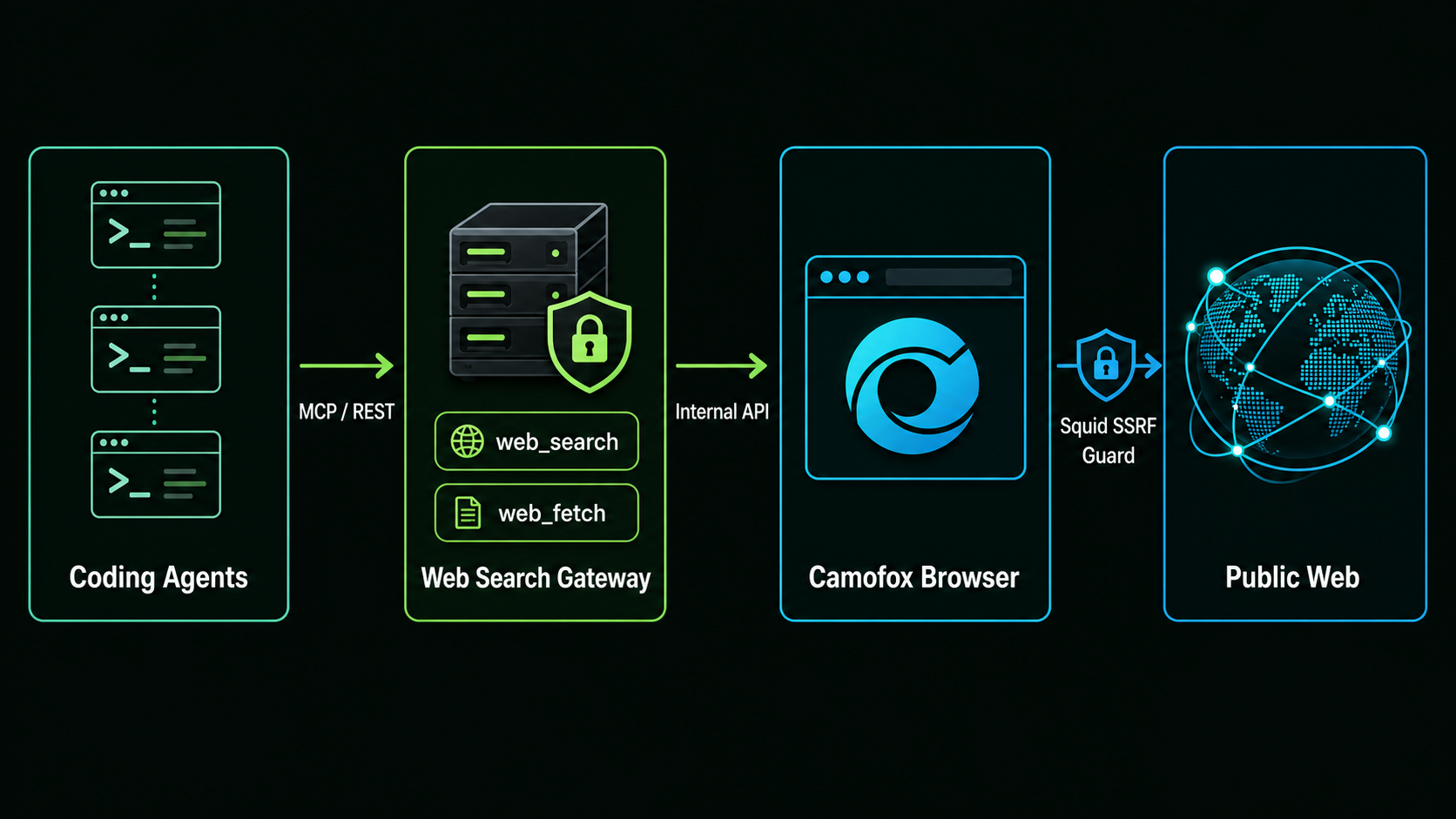
Agents can access only the gateway. Camofox stays on the internal network, and its browser traffic can reach the public web only through the SSRF-filtering Squid egress guard.
First create a version-pinned deployment with the server guide. On the machine where the Agent runs, install the configuration CLI and export the public key generated by the server:
npm install -g camofox-web-search
export WEB_SEARCH_API_KEY="<copy securely from the server .env>"
These Agents use the Gateway's Streamable HTTP MCP endpoint and do not require an additional native plugin package:
camofox-web-search install codex --endpoint https://search.example.com --scope user
camofox-web-search install claude --endpoint https://search.example.com --scope user
camofox-web-search install opencode --endpoint https://search.example.com --scope user
Restart the selected Agent, then verify it with the matching target:
camofox-web-search doctor codex --endpoint https://search.example.com --scope user --live
camofox-web-search install workbuddy --endpoint https://search.example.com --scope user
camofox-web-search doctor workbuddy --endpoint https://search.example.com --scope user --live
The installer configures a bundled stdio bridge so the API key never enters WorkBuddy's static HTTP headers. Make WEB_SEARCH_API_KEY available to the desktop process, restart WorkBuddy, trust camofox_web, and confirm the connector is green. Follow the WorkBuddy guide for user/project scope, OS environment setup, usage, diagnostics, and removal.
camofox-web-search install pi --endpoint https://search.example.com --scope user
camofox-web-search doctor pi --endpoint https://search.example.com --scope user --live
pi
This also runs pi install npm:camofox-web-search-pi and provides native web_search and web_fetch tools.
camofox-web-search install openclaw --endpoint https://search.example.com --scope user
# Persist WEB_SEARCH_API_KEY in ~/.openclaw/.env for a managed Gateway.
openclaw gateway restart
camofox-web-search doctor openclaw --endpoint https://search.example.com --scope user --live
openclaw tui
This installs camofox-web-search-openclaw, selects the native search/fetch providers, and keeps the API key behind environment SecretRefs. Follow the OpenClaw guide for secret persistence, proxy configuration, runtime verification, and removal.
camofox-web-search install hermes --endpoint https://search.example.com --scope user
# Persist WEB_SEARCH_API_KEY in ~/.hermes/.env.
camofox-web-search doctor hermes --endpoint https://search.example.com --scope user --live
hermes -t web chat --tui
This installs camofox-web-search-hermes into Hermes' Python environment, enables it, and selects camofox for search and extraction. Follow the HermesAgent guide for Python/uv discovery, secret persistence, verification, and removal.
Custom Agents can use /mcp, the REST API, or the typed TypeScript client directly. After cloning this repository, the runnable Deep Agents example needs no native plugin:
cd examples/deepagents
cp .env.example .env
uv sync --locked
uv run --env-file .env python agent.py --transport mcp --stream \
  "Research Camofox Browser and cite primary sources"
See the examples guide for model-provider configuration, REST mode, and manual Agent configurations.
Codex, Claude Code, OpenCode, WorkBuddy, and Pi also support project scope. OpenClaw and HermesAgent native plugins are user-scoped. The installer stores only non-secret connection metadata and environment-variable references, never the token.
| Interface | Endpoint or package | Use case |
|---|---|---|
| MCP | /mcp |
Codex, Claude Code, OpenCode, WorkBuddy, and custom MCP clients |
| REST | /v1/search, /v1/fetch |
Pi and application integrations |
| OpenClaw | camofox-web-search-openclaw |
Native web_search and web_fetch providers |
| HermesAgent | camofox-web-search-hermes |
Native web_search and web_extract providers |
| TypeScript | camofox-web-search-client |
Typed Node.js applications |
| OpenAPI | /openapi.json |
Contract discovery and client generation |
See the examples for manual Agent configuration and a custom LangChain Deep Agents research Agent.
Configure the secret-safe stdio bridge, pass the API key through the desktop process environment, approve trust, and verify live search/fetch.
Install the native npm provider, persist the Gateway SecretRef, verify runtime registration, handle proxy exclusions, and start using web_search/web_fetch.
Install into the correct Hermes Python environment, use bundled uv, verify real plugin discovery, and start the TUI with the web toolset.
Only two high-level read-only tools are exposed. Browser clicking, typing, script evaluation, cookie import, and authenticated browsing are intentionally unavailable. Camofox has no direct external network access: browser traffic passes through Squid, which rejects private, reserved, local, and metadata destinations.
Search results and fetched pages are untrusted input. Tool output includes warning boundaries, but every caller must retain its own prompt-injection policy.
Search defaults to duckduckgo → brave → bing → google. Blocked providers enter a cooldown and are skipped automatically, while Google is separately limited to one concurrent attempt. Provider order and cooldowns are configured on the server, so Agent configurations do not change.
Fetch performs one bounded readiness retry for empty or iframe-only pages. This lets transient WeChat verification interstitials finish while reporting persistent challenges as typed fetch_blocked errors instead of returning placeholder content.